Bottleneck identification
Find the stations that constrain throughput and see where work starts to queue.
PilotLine / Production line simulation
Simulate production lines without being a simulation expert.
Free to try · Early beta
Use sample or generalized data only.
01 / What you can evaluate
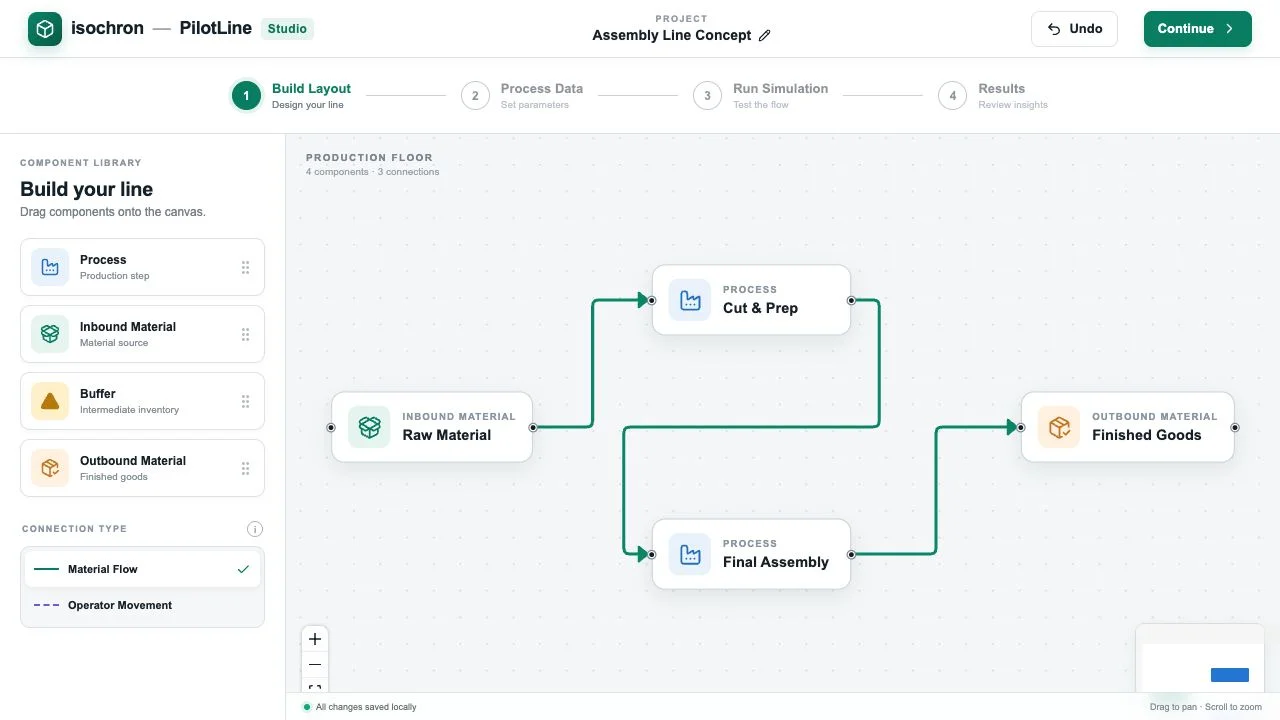
Use simulation to understand how stations work together and evaluate changes before making them on the shop floor.
Find the stations that constrain throughput and see where work starts to queue.
Estimate line output under different cycle times and resource assumptions.
Follow materials through stations and buffers to see how delays affect downstream steps.
Test alternative layouts or process settings and compare the simulated outcomes.
02 / The PilotLine workflow
Place stations, buffers and material sources on the canvas. Connect them in production order.
Set process parameters using sample cycle times and generalized assumptions.
Test how materials move through the line under the conditions you modeled.
Inspect the results, change an assumption and run another scenario to compare.
PilotLine early beta
Start with a sample layout and see what changes when you adjust a station.
Get in touch
Tell us what you would like to explore.